Online or onsite, instructor-led live Microsoft .NET training courses demonstrate through hands-on practice the fundamentals and applications of Microsoft .NET.
Microsoft .NET training is available as "online live training" or "onsite live training". Online live training (aka "remote live training") is carried out by way of an interactive, remote desktop. Onsite live Microsoft .NET trainings in Nantes can be carried out locally on customer premises or in NobleProg corporate training centers.
NobleProg -- Your Local Training Provider
Nantes, Zenith
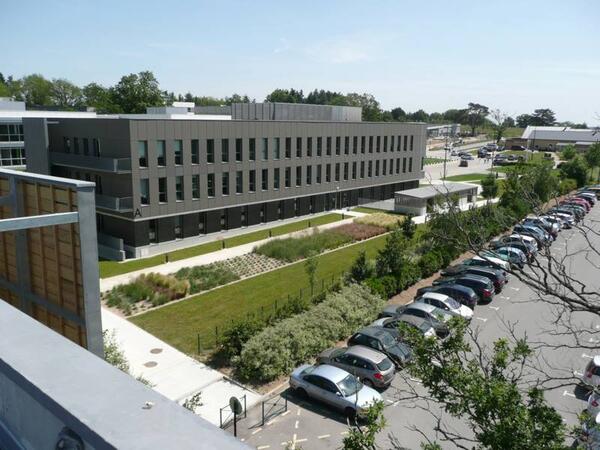
NobleProg Nantes, 4 rue Edith Piaf, Saint-Herblain, france, 44821
In the Parc d'Ar Mor zone, near the Zénith.
Car : from the ring road, Porte de Chézine Exit> Boulevard du Zenith > Esplanade Georges Brassens (restaurants) > Rue Edith Piaf on the right. From the N444 road (Nantes > Lorient), Exit #1 > boulevard Marcel Paul > Rue Edith Piaf at the right.
Parking Zénith P1 (free). Once parked, you can recognize the building: it's one of the tree bulding with zinc frontage.
Bicycle: free indoor parking
Public transport :
Tramway R1, Schoelcher station + 10 mn by foot through commercial center Atlantis
Tramway R1, François Mitterrand stop + bus 50, stop at Saulzaie station or bus 71, stop at the Zénith station
Tramway R3, Marcel Paul station + bus 50, Saulzaie station
Chronobus C6, Hermeland station+ bus 71, Zénith station
Bus : lignes 50 (Saulzaie station) or 71 (Zénith station)
This instructor-led, live training in Nantes (online or onsite) is aimed at data scientists and developers who wish to use ML.NET machine learning models to automatically derive projections from executed data analysis for enterprise applications.
By the end of this training, participants will be able to:
Install ML.NET and integrate it into the application development environment.
Understand the machine learning principles behind ML.NET tools and algorithms.
Build and train machine learning models to perform predictions with the provided data smartly.
Evaluate the performance of a machine learning model using the ML.NET metrics.
Optimize the accuracy of the existing machine learning models based on the ML.NET framework.
Apply the machine learning concepts of ML.NET to other data science applications.
This instructor-led live training in Nantes (available online or onsite) targets web developers who wish to learn how to utilize Progressive Web Application (PWA) development features to create an app-like experience on a website using Entity Framework (EF) Core and Blazor.
By the end of this training, participants will be able to:
Use the EF package to work with databases.
Use Blazor components, services, dependency injection, layout, and routing.
Create service workers to enable PWA features in an application.
Utilize push notifications and other PWA features.
.NET 8 represents Microsoft’s most recent long-term support (LTS) release, designed for constructing modern, high-performance, cross-platform applications utilizing C#.
This instructor-led live training session (available online or onsite) targets beginner to intermediate developers who possess limited to moderate experience with .NET and aim to develop real-world applications on the .NET 8 platform using C#.
Upon completion of this training, participants will be equipped to:
Comprehend the .NET 8 architecture, SDK, and various project types.
Develop console and web applications using C# and ASP.NET Core 8.
Engage with data access mechanisms (Entity Framework Core) and dependency injection.
Apply fundamental testing, configuration, and deployment best practices.
Course Format
Interactive lectures and discussions.
Practical coding exercises and hands-on sessions.
Live implementation of sample projects using Visual Studio or VS Code.
Course Customization Options
For customized training requests for this course (such as incorporating .NET 9 features), please reach out to us to arrange.
This instructor-led live training in Nantes (online or onsite) targets intermediate-level software developers and automation engineers seeking to build applications that communicate with PLCs and interact with SQL databases using Visual Studio.
By the end of this training, participants will be able to:
Develop .NET applications in Visual Studio for industrial automation.
Communicate with PLCs using industrial protocols such as OPC UA.
Implement database interactions with SQL Server for storing and retrieving PLC data.
Optimize application performance for real-time industrial environments.
This instructor-led, live training in Nantes (online or onsite) is aimed at web developers who wish to use Blazor Web Assembly to build a web application.
By the end of this training, participants will be able to:
Understand forms and authentication in Blazor WebAssembly.
This instructor-led, live training in Nantes (online or onsite) is designed for intermediate-level programmers who intend to develop applications in ASP.NET using C#.Net. It supports the transition from Visual Basic to build robust web interfaces and integrate PLC functionality for medical device projects.
By the end of this training, participants will be able to:
Learn foundational and intermediate concepts of C#.Net.
Enable participants to transition from Visual Basic to C#.
Develop skills for creating applications using ASP.NET tailored to medical device interfaces.
Strengthen understanding of linking PLC functionality with web-based interfaces.
Combining Unity, Blender, and Visual Studio creates a robust toolkit for building and programming industrial virtual environments. Unity facilitates interactive simulation and visualization, Blender provides advanced 3D modeling tools, and Visual Studio acts as the central programming hub for integrating control systems and industrial logic.
This instructor-led training (available online or onsite) targets beginner to intermediate professionals seeking to design, model, and program industrial environments for simulation, training, and integration needs.
Upon completing this course, participants will be able to:
Design and model industrial equipment and scenarios using Blender.
Import and optimize 3D models in Unity for visualization.
Program system logic and integration workflows in Visual Studio.
Create interactive industrial virtual environments with control system connections.
Format of the Course also allows for the evaluation of participants.
Interactive lecture and discussion.
Hands-on 3D modeling and environment development.
Programming and integration exercises with live demonstrations.
Course Customization Options
To request a customized training for this course, please contact us to arrange.
This instructor-led live training, located in Nantes (online or onsite), is designed for developers at the beginner to intermediate level who intend to develop applications using Visual Studio.
By the conclusion of this course, participants will be able to:
Make effective use of Visual Studio 2022 features.
Run and manage unit tests.
Debug applications and work with code hosted in remote repositories.
In this instructor-led live training in Nantes, participants will learn how to install, configure, and administer RabbitMQ, followed by integrating RabbitMQ messaging into several sample .NET applications.
By the end of this training, participants will be able to:
Set up, configure, and manage RabbitMQ.
Understand RabbitMQ's role in the design and implementation of a microservices architecture.
Comprehend how RabbitMQ compares to other Message Queuing Architectures.
Set up and use RabbitMQ as a broker for handling asynchronous and synchronous messages for real-world enterprise .NET applications.
This instructor-led, live training in Nantes is tailored for anyone looking to learn C# specifically for automation testing. It offers a condensed, intensive curriculum packed with practical exercises, enabling participants to rapidly acquire the essential programming skills required for software automation testing. The emphasis is on C# fundamentals that can be directly and immediately applied to test automation.
This course does not delve into advanced test automation frameworks like Selenium. If you are already proficient in C# and want to start testing with Selenium right away, please visit: Selenium WebDriver in C#: Introduction to web testing automation in C#.
This C# course empowers participants to develop applications using the C# programming language. Participants will learn to program utilizing the principles of object-oriented design. Additionally, the course covers how to leverage the Visual Studio development environment to create robust and maintainable applications.
Target Audience
This course is designed for the following types of software developers:
New developers
Developers who understand computer programming but may have learned programming by using a non-graphical language in a university
These developers aim to build solutions using C# within the Microsoft .NET Framework. They also seek to employ Object-Oriented techniques to enhance their development skills.
This instructor-led, live training in Nantes introduces advanced features of C#, examines its usage as both a desktop application programming language and a web programming language for solving real-world problems.
Programming techniques and principles are demonstrated and practiced through in-class, hands-on exercises and walk-throughs.
During this instructor-led live training in Nantes, participants will learn how to leverage Entity Framework Core 2.0 to create an ASP.NET Core application.
By the end of this training, participants will be able to:
Set up the necessary framework and tools for creating Entity Framework Core 2.0 MVC web applications.
Perform database operations on MS SQL Server.
Use a 'code first' and 'database first' approach to application development.
This instructor-led, live training in Nantes (online or onsite) is designed for web developers who wish to use Blazor to create full-stack C# web applications.
By the end of this training, participants will be able to:
Develop web applications with C# and Blazor.
Use C# code to call JavaScript APIs and libraries.
Run client-side C# code and client logic directly in a browser or server.
After developers complete a segment of code, they typically integrate it into the application, copy the application to a folder, run the installer, and then initialize the application to verify its expected behavior. This manual workflow is difficult to scale, is tedious, prone to errors, and lacks effective mechanisms for tracking changes throughout the process.
A superior alternative is to automate these steps using Continuous Integration. Continuous Integration encompasses the processes, tools, and infrastructure required to automate the building, deployment, and testing of software applications.
In this instructor-led, live training (available onsite or remotely), participants will learn how to transition from a traditional, manual (or semi-manual) software deployment approach to an agile, Continuous Integration (CI) workflow using Jenkins. Throughout the course, participants will engage in a series of hands-on, live-lab exercises, applying their new knowledge to various software development and deployment challenges at every stage. Interaction between the instructor and participants is encouraged. Real-world scenarios will be discussed, and specific issues and questions will be addressed and resolved during the training. The course places particular emphasis on .Net application development.
Upon completion of this training, participants will be able to:
Install and configure Jenkins for .Net application development.
Utilize Jenkins to automate the process of checking in and merging .Net source code into a repository.
Leverage Jenkins to automate the downloading, compilation, and deployment of an application to a release server.
Integrate Jenkins with other software development tools, such as issue trackers and more.
Audience
.Net developers
Build engineers
QA engineers
Project managers
Release managers
DevOps engineers
Course Format
A mix of lectures, discussions, exercises, and extensive hands-on practice.
Note
For requests for customized training for this course, please contact us to make arrangements.
Microservice architecture represents an approach to building software applications as a collection of small, independent services. Each service operates within its own process and communicates via lightweight mechanisms, such as HTTP resource APIs. These services can be efficiently deployed using continuous automation systems, eliminating the need for centralized management. Additionally, microservices can be developed in various programming languages and integrated with diverse data storage solutions.
This instructor-led live training is designed for enterprise developers and architects. It introduces microservice architecture from a .Net perspective, outlines migration strategies from monolithic systems, and guides participants through the creation and deployment of a sample microservice-based application.
Upon completion of this training, participants will be able to:
Determine the appropriate contexts for utilizing and avoiding microservice architecture
Develop and implement a testing strategy for microservices
Deploy a sample microservice-based application into a production environment
Refactor a monolithic application into distinct services
Audience
Developers
Architects
Course Format
A combination of lectures, discussions, exercises, and extensive hands-on practice
This instructor-led, live training provides a hands-on path through modern .NET 8 development, enterprise architecture, and progressive migration from legacy .NET Framework environments. Participants learn to build ASP.NET Core REST APIs, apply dependency injection and centralized logging, secure web applications, and execute real-world coexistence and modernization strategies.
By the end of this training, participants will be able to:
Build high-performance applications using modern C# and .NET 8.
Design robust REST APIs with ASP.NET Core.
Configure enterprise DI, logging, and error handling pipelines.
Apply architecture patterns for scalable .NET solutions.
Secure web applications and APIs.
Enforce code quality and maintainability.
Plan and execute progressive migrations from .NET Framework to .NET 8.
ASP.NET MVC 6 is a new feature in Visual Studio 2015 and represents the latest advancement in Microsoft's web development stack. This course covers the most recent APIs and development techniques for building dynamic, modular, and testable web sites. We will explore the new features available in MVC6 and demonstrate how to maximize the benefits of the latest toolset and integration possibilities.
What you will learn
Understand MVC architecture principles and benefits
Creating views, view components, and tag helpers
Using ASP.NET dependency injection
Creating RESTful services using Web API
Getting the best out of GruntJS, NPM, and Bower integration
This course is tailored for individuals eager to master the C# programming language and explore the fundamental features of the .NET platform. Throughout the training, participants will gain insights into C#'s integration capabilities, learn how to configure their development environment to write basic programs, and utilize standard libraries effectively.
In this instructor-led live training in Nantes (onsite or remote), participants will learn how to create automation workflows, manipulate data within those workflows, debug issues, and set up the necessary end-to-end infrastructure to deploy a fully-fledged robotic workflow.
By the conclusion of this training, participants will be able to:
Design, deploy, and manage a robotic workforce that mimics real employees.
Apply this RPA solution to various business areas, including finance, BPO, software, and insurance.
In this instructor-led live training in Nantes (onsite or remote), participants will learn how to create an automation workflow, manipulate data within the workflow, debug issues and set up the necessary end-to-end infrastructure needed to deploy a full-fledged robotic workflow.
By the end of this training, participants will be able to:
Design, deploy and manage a robotic workforce that mimics real employees.
Apply this RPA solution to various business areas, including finance, BPO, software, and insurance.
Format of the Course also allows for the evaluation of participants.
A blend of lectures, discussions, exercises, and extensive hands-on practice in a live-lab environment.
Read more...
Last Updated:
Testimonials (7)
Interactivity and on-the-fly code solutions
Eduard-Emanuel Zaharia - Kruk Italia
Course - Advanced Blazor
fluid exchanges, trainer's listening and adaptability
Mathieu - Cetim
Course - Visual Studio 2022 IDE
Machine Translated
I really appreciated the way each chapter was exemplified. Tibor did an excellent job of showing us potential pitfalls in each exercise if we overlook small details. This approach was incredibly helpful and insightful
Ana-Maria - DB Global Technology
Course - PowerShell Master Class
Resources available for use were plentiful.
Kehinde - Computerbits
Course - Programming in C#
Shane is very experienced, knowledgeable, and willing to help and explain when people have questions. I liked most that Shane creates an atmosphere in which asking questions is safe and encouraged, which is extremely important to learning in my opinion.
Online Microsoft .NET training in Nantes, Microsoft .NET training courses in Nantes, Weekend Microsoft .NET courses in Nantes, Evening Microsoft .NET training in Nantes, Microsoft .NET instructor-led in Nantes, Microsoft .NET coaching in Nantes, Microsoft .NET boot camp in Nantes, Microsoft .NET instructor-led in Nantes, Online Microsoft .NET training in Nantes, Evening Microsoft .NET courses in Nantes, Weekend Microsoft .NET training in Nantes, Microsoft .NET on-site in Nantes, Microsoft .NET trainer in Nantes, Microsoft .NET one on one training in Nantes, Microsoft .NET instructor in Nantes, Microsoft .NET classes in Nantes, Microsoft .NET private courses in Nantes