Online or onsite, instructor-led live PowerPoint training courses demonstrate through interactive hands-on practice how to use Microsoft PowerPoint to create, design, and deliver professional presentations effectively.
PowerPoint training is available as "online live training" or "onsite live training". Online live training (aka "remote live training") is carried out by way of an interactive, remote desktop. Onsite live PowerPoint training can be carried out locally on customer premises in Lyon or in NobleProg corporate training centers in Lyon.
NobleProg -- Your Local Training Provider
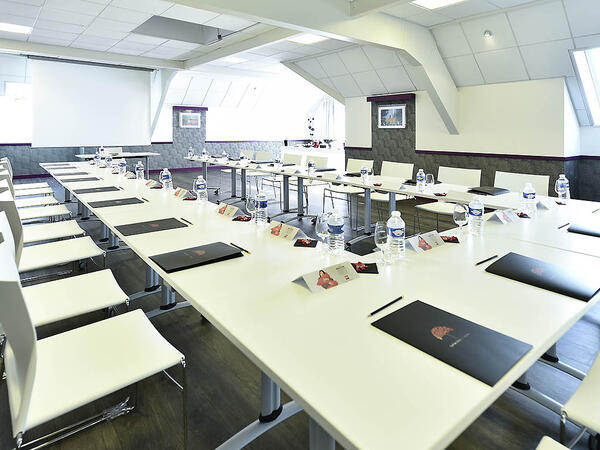
Lyon, Swisslife Tower
NobleProg Lyon, 10 Place Charles Béraudier, Lyon, france, 69000
Located 200 meters far from the train station TGV, Swisslife Tower is today the most representative building of this quarter of Lyon. The Business Center offers you a perfect location for your training.
Gares TGV
100meters from Gare TGV Part-Dieu , porte du Rhône Exit
Aéroport
30 minutes from Lyon Saint Exupéry (Satolas)
Rhône Express from Saint Exupéry airport (Terminus Gare part-Dieu)
Delivered as an instructor-led, live training session (available online or onsite), this program is designed for business professionals, educators, and marketers at a beginner to intermediate proficiency level who aim to combine DeepSeek with PowerPoint to automate and optimize their workflow.
Upon completion of this training, participants will be equipped to:
Automate the generation of text-based content within PowerPoint slides using DeepSeek.
Create data-driven visuals and infographics leveraging DeepSeek models.
Utilize AI to condense lengthy reports and convert them into presentation-ready slides.
Seamlessly integrate DeepSeek with PowerPoint to facilitate streamlined, dynamic presentations.
Unlocking the full potential of PowerPoint extends far beyond the fundamentals, enabling the creation of polished, scalable presentations that truly captivate audiences. This course explores advanced customization of slide and handout masters, the development of custom templates, the strategic use of SmartArt for visual process mapping, and deep integration with Excel for building live-linked data dashboards and charts. Participants will gain access to power-user workflows through add-ins such as Office Timeline and Poll Everywhere, designed to accelerate the production of complex decks, streamline review cycles, and deliver high-impact business presentations.
PowerPoint professionals aiming for polished presentations can benefit from advanced slide design techniques that transform basic content into visual stories. This course dives into core principles of slide composition, chart and infographic creation, and image editing, while building practical skills in visually distributing elements, emphasizing key information, and personalizing the working environment. Professionals walk away with actionable strategies for crafting clean, compelling slides and delivering confident presentations with structured public speaking techniques.
Enhancing the capability to craft compelling presentations using PowerPoint and other professional tools.
Target Audience:
This workshop is designed for sales representatives, consultants, research and teaching staff, managers, educators, corporate employees, SMEs, and public institution professionals. It is ideal for anyone facing the challenge of engaging a group, speaking effectively, and sparking their interest.
Master the art of transforming complex financial data into persuasive executive presentations using PowerPoint. This course covers essential design strategies, including slide structuring, the use of treemaps and sunburst diagrams, budget chart layouts, and streamlined reporting tables that highlight critical financial metrics. Participants will learn to integrate Excel for dynamic data, emphasize key figures effectively, and deliver confident financial narratives that secure stakeholder support.
Read more...
Last Updated:
Testimonials (2)
Excellent course and course content...
Jayraj Gangadeya - Kerry Ingredients
Course - Advanced MS PowerPoint
I enjoyed all of the tips and tricks that Adam provided. He is very knowledgeable about this subject. He also made following along very easy.
Online MS PowerPoint training in Lyon, PowerPoint training courses in Lyon, Weekend PowerPoint courses in Lyon, Evening Microsoft PowerPoint training in Lyon, PowerPoint instructor-led in Lyon, Microsoft PowerPoint private courses in Lyon, Microsoft PowerPoint on-site in Lyon, Microsoft PowerPoint instructor in Lyon, PowerPoint coaching in Lyon, PowerPoint trainer in Lyon, Microsoft PowerPoint classes in Lyon, Weekend Microsoft PowerPoint training in Lyon, Evening MS PowerPoint courses in Lyon, MS PowerPoint instructor-led in Lyon, MS PowerPoint boot camp in Lyon, PowerPoint one on one training in Lyon, Online PowerPoint training in Lyon