Online or onsite, instructor-led live Graphic Design training courses demonstrate through interactive hands-on practice the fundamentals and advanced topics of Graphic Design.
Graphic Design training is available as "online live training" or "onsite live training". Online live training (aka "remote live training") is carried out by way of an interactive, remote desktop. Lyon onsite live Graphic Design trainings can be carried out locally on customer premises or in NobleProg corporate training centers.
NobleProg -- Your Local Training Provider
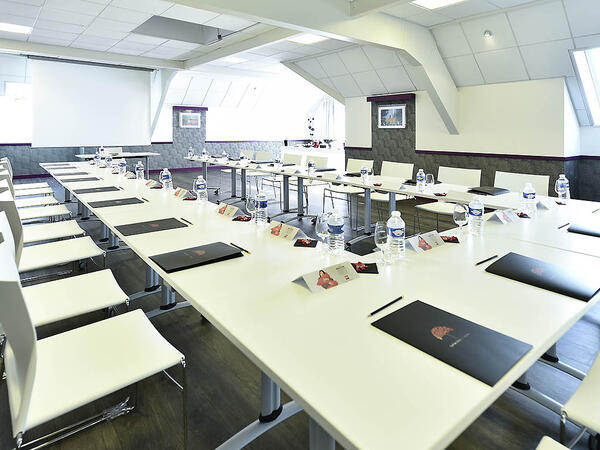
Lyon, Swisslife Tower
NobleProg Lyon, 10 Place Charles Béraudier, Lyon, france, 69000
Located 200 meters far from the train station TGV, Swisslife Tower is today the most representative building of this quarter of Lyon. The Business Center offers you a perfect location for your training.
Gares TGV
100meters from Gare TGV Part-Dieu , porte du Rhône Exit
Aéroport
30 minutes from Lyon Saint Exupéry (Satolas)
Rhône Express from Saint Exupéry airport (Terminus Gare part-Dieu)
Adobe Marketo Engage is a robust platform that combines marketing automation with CRM capabilities, empowering organizations to create, automate, and evaluate personalized marketing campaigns across multiple channels. This course provides participants with the theoretical knowledge and practical skills needed to build intelligent workflows, segment audiences, utilize AI-driven personalization, and effectively analyze campaign performance.
This live, instructor-led training (available online or onsite) is designed for beginner to intermediate-level participants seeking to enhance their proficiency in using Adobe Marketo Engage to plan, execute, and optimize omnichannel marketing campaigns for both academic and commercial objectives.
Upon completion of this training, participants will be able to:
Navigate the Marketo Engage interface and comprehend its core automation functions.
Design and deploy lead nurturing workflows and dynamic content campaigns.
Segment and manage audiences using smart lists and AI-generated insights.
Integrate CRM systems to ensure seamless data synchronization and tracking.
Analyze performance metrics and apply optimization techniques based on campaign data.
Develop an end-to-end automated marketing project tailored to higher education.
Course Format
Theoretical instruction supported by real-world case studies.
Hands-on demonstrations conducted in a controlled lab environment.
Interactive exercises and a practical workshop project.
Final assessment through the presentation of a functional automated campaign.
Customization Options
To request customized training for this course, please contact us to arrange your session.
Adobe Creative Cloud offers a comprehensive suite of industry-leading tools for creative professionals, facilitating high-quality design, multimedia production, and collaboration. This course provides faculty members with practical experience using Adobe’s core applications to create academic and institutional materials, thereby enhancing creativity, innovation, and communication within the teaching and learning process.
This instructor-led, live training (available online or onsite) is designed for beginner to intermediate participants seeking to develop digital competencies in graphic design, multimedia editing, and academic content creation using Adobe Creative Cloud tools.
Upon completion of this training, participants will be able to:
Navigate the Adobe Creative Cloud ecosystem and manage files via the cloud.
Design and edit professional visual materials using Photoshop, Illustrator, and InDesign.
Create engaging video and motion graphics content with Premiere Pro and After Effects.
Produce and secure PDF documents using Adobe Acrobat Pro DC.
Leverage Adobe Express and Firefly for generative AI design and digital marketing assets.
Integrate Adobe tools to develop institutional and academic multimedia projects.
Format of the Course also allows for the evaluation of participants.
Project-based learning with hands-on exercises.
Guided demonstrations using official Adobe software.
Practical assignments, partial evaluations, and a final integrative project.
Course Customization Options
To request a customized training for this course, please contact us to arrange.
Adobe Hyvä is a contemporary frontend framework for Magento 2 that supersedes the traditional Luma stack, offering a developer-centric architecture designed for superior performance.
This live, instructor-led training (available online or on-site) is designed for intermediate to advanced Magento developers looking to implement and tailor Hyvä Themes within Adobe Commerce (Magento 2) projects.
Upon completion of this training, participants will be able to:
Grasp the architectural foundation and advantages of Hyvä Themes.
Install and configure a Magento 2 store utilizing Hyvä.
Customize templates, styles, and layouts using Alpine.js and Tailwind CSS.
Integrate third-party modules while ensuring compatibility with Hyvä.
Enhance performance and user experience by leveraging Hyvä's streamlined frontend stack.
Course Format
Interactive lectures and discussions
Practical exercises and lab sessions
Implementation in a live development environment
Customization Options
For customized training arrangements, please contact us.
Adobe Express is a user-friendly, cloud-based design tool that enables individuals and teams to quickly create high-quality graphics, videos, and branded content without advanced design experience.
This instructor-led, live training (online or onsite) is aimed at beginner-level users who wish to create visually appealing marketing assets, presentations, and social media content using Adobe Express.
By the end of this training, participants will be able to:
Navigate the Adobe Express interface and use templates effectively.
Create social media graphics, flyers, presentations, and short videos.
Apply branding elements such as colors, logos, and fonts consistently.
Collaborate and publish designs using Adobe Express's cloud features.
Format of the Course also allows for the evaluation of participants.
Interactive lecture and discussion.
Lots of exercises and practice.
Hands-on implementation in a live-lab environment.
Course Customization Options
To request a customized training for this course, please contact us to arrange.
This instructor-led, live training in Lyon (online or onsite) is aimed at beginner-level to intermediate-level professionals who wish to optimize their document workflows using Adobe Acrobat and AI-powered tools.
By the end of this training, participants will be able to:
Create and edit PDF documents from various sources.
Modify PDF content, including text, images, and formatting.
Use annotation and markup tools for document review.
Implement security features to protect PDF documents.
Leverage AI-powered tools to automate PDF-related tasks.
This instructor-led, live training in Lyon (online or onsite) targets beginner to intermediate graphic designers and animators who wish to learn how to produce stunning animations, interactive media, and engaging web content using Adobe Animate.
By the conclusion of this training, participants will be able to:
Navigate the Adobe Animate interface and tools.
Create and edit animations using keyframes, motion tweens, and shape tweens.
Design interactive animations and applications with ActionScript and JavaScript.
Incorporate audio and video elements into projects.
Export animations for web, video, and mobile platforms.
This instructor-led live training in Lyon (online or onsite) is aimed at beginner-level content developers who wish to gain a foundational understanding of Adobe After Effects, Adobe Premiere Pro, Adobe Illustrator, Adobe Animate, and Adobe Character Animator.
By the end of this training, participants will be able to:
Understand the core functions of each software tool in the Adobe Creative Suite.
Use tools and techniques in Adobe After Effects for motion graphics, Adobe Premiere Pro for video editing, Adobe Illustrator for graphic design, Adobe Animate for animations, and Adobe Character Animator for character animation.
Improve creative design and production capabilities, enabling faster and more efficient development of high-quality digital content.
This instructor-led, live training in Lyon (online or onsite) is designed for beginner and intermediate photographers seeking to maximize the potential of Darktable for their image editing and management needs. The course outline provides a thorough overview of the Darktable software, starting with the basics and moving toward advanced editing techniques.
By the end of this training, participants will be able to:
Set up a development environment with Darktable.
Import, organize, and manage their photo collections.
Edit and enhance images using Darktable's features.
Perform advanced color correction and manipulation.
This instructor-led, live training in Lyon (online or onsite) is aimed at beginner-level to advanced-level engineers and drafters who wish to use GD&T to create precise and standardized 2D drawings for engineering projects.
By the end of this training, participants will be able to:
Understand and apply GD&T symbols and concepts to 2D drawings.
Create clear and standardized technical drawings using GD&T principles.
Interpret and implement feedback based on GD&T annotations.
Collaborate effectively with teams using standardized GD&T notations.
For many of us, Adobe Acrobat Reader is primarily a tool for viewing PDF files.
However, this application also enables you to generate PDF documents to meet your specific needs, offering an alternative to formats created in popular programs such as Microsoft Office, Word, Excel, and PowerPoint.
This training on creating PDF documents is designed for individuals who wish to master the intricacies of PDF composition.
Course Format
Hands-on exercises following an instructional lecture.
Adobe After Effects Essentials is a two-day training course designed to equip you with the fundamental skills required to get started with Adobe After Effects. Throughout the course, you will learn how to manage layers, understand keyframing, control animations, work with transparency, and gain a deeper understanding of rendering and output processes. By the conclusion of the course, you will be able to competently edit video content using After Effects while applying industry best practices.
The Adobe After Effects Essentials course covers all the essential skills necessary for the post-production of professional-quality video content.
Experienced graphic and media designers who are already comfortable with core Adobe tools and want to strengthen advanced workflows, corporate report design, infographic creation, branding systems, and AI-assisted production.
Format of Training
Instructor-led sessions with structured explanations
Demonstrations followed by guided hands-on exercises
Practical work based on real corporate design scenarios
Individual and group feedback during exercises and project work
Course Objectives
By the end of this training course, participants will be able to:
Use advanced Adobe Creative Cloud features to work more efficiently across tools
Apply AI-powered capabilities in Photoshop, Illustrator, and InDesign to accelerate design tasks
Create high-quality visual assets for corporate reports and presentations
Design professional infographics aligned with brand and communication standards
Build consistent branding and layout systems across multiple deliverables
Automate report layouts and publishing workflows using InDesign
Apply AI responsibly while maintaining visual consistency and brand control
This instructor-led, live training in Lyon (online or onsite) is aimed at graphic designers and illustrators who wish to use the advanced tools in Adobe Illustrator to create professional and high-quality vector artwork, illustrations, and graphic designs.
By the end of this training, participants will be able to:
Explore the new and advanced features in Adobe Illustrator.
Gain insights and tips on leveraging advanced Illustrator tools effectively.
Convert hand-drawn sketches into digital images.
Produce professional-grade graphics, logos, and animated GIFs.
This instructor-led, live training in Lyon (online or onsite) targets advanced creative professionals aiming to use Adobe Creative Cloud to produce advanced branded graphics, professional video content, motion assets, and integrated digital media deliverables.
By the end of this training, participants will be able to: create advanced visual assets, edit and finalize professional video, build motion graphics, and streamline workflows across Adobe applications.
This instructor-led, live training in Lyon (online or onsite) is aimed at intermediate-level creative professionals who wish to use Adobe Creative Cloud to create workplace-ready graphics, video content, and digital media assets.
By the end of this training, participants will be able to: create branded assets, edit professional video, produce basic motion graphics, and work more efficiently across Adobe applications.
This course offers hands-on expertise in developing interactive eLearning content. Beyond mastering fundamental concepts, participants will acquire industry best practices for creating and publishing Captivate projects. Key learning outcomes include:
Recording demonstrations
Editing demonstrations
Managing objects within the Timeline
Utilizing images
Publishing projects
Incorporating audio
Recording simulations
Adding animation
Creating slideshows
Exporting results to a Learning Management System (LMS)
This instructor-led, live training in Lyon (online or onsite) is aimed at beginner-level to intermediate-level graphic designers, marketing professionals, and publishing specialists who wish to use Adobe InDesign to create professional-quality books, brochures, posters, and marketing materials.
By the end of this training, participants will be able to:
Navigate the Adobe InDesign interface efficiently.
Set up projects with the correct dimensions and layouts.
Work with text, images, and graphics to create compelling designs.
Utilize styles, templates, and color palettes for consistency and efficiency.
Prepare files for professional printing or digital publishing.
Essential Tools and Features Participants will become acquainted with Canva's core tools, including adding and formatting text, as well as working with images and graphics – the fundamental basis for creating clear and visually appealing designs.
Developing Your First Project Through a practical session, participants will build their first project, learning how to select templates, customize colors and fonts, and personalize designs with their own unique elements.
Advanced Design Techniques Participants will explore advanced features to produce professional and distinctive projects, covering gradients, infographics, diagrams, and photo editing techniques such as filters, cropping, and color correction.
AI Integration in Canva Participants will learn to utilize AI tools to automate tasks, generate graphics and text, and streamline the design workflow, thereby enhancing both efficiency and output quality.
This instructor-led live training in Lyon (online or onsite) is designed for individuals aspiring to become graphic designers.
Upon completion of this course, participants will be able to:
Grasp fundamental design theory and apply practical design techniques.
Effectively utilize Adobe Creative Cloud applications, including Photoshop, Illustrator, and InDesign.
Explore alternative solutions to Adobe Creative Cloud.
Stay informed about the latest design trends.
Read more...
Last Updated:
Testimonials (3)
What I liked most about the training was the technical color and video performance theory session. It helped me clearly understand the reasoning behind key production decisions, such as why specific frame rates are chosen for different types of videos and how particular color spaces impact visual quality and performance. Having this theoretical foundation made the technical concepts more meaningful and easier to apply in practical scenarios.
Jason Lee
Course - Adobe Creative Cloud (After Effects, Premiere Pro, Illustrator, Animate, and Character Animator) for Beginners
Marko was very knowledgeable, friendly and explained in a very clear way. He also brought so many use cases, examples from his broad experience and was super interactive with us.
Delia Roxana Isfan-Stan
Course - Adobe Acrobat: PDF Creation and Editing
I liked the part the most where we learn how to create objects.
Online Graphic Design training in Lyon, Graphic Design training courses in Lyon, Weekend Graphic Design courses in Lyon, Evening Graphic Design training in Lyon, Graphic Design instructor-led in Lyon, Graphic Design one on one training in Lyon, Online Graphic Design training in Lyon, Graphic Design on-site in Lyon, Graphic Design boot camp in Lyon, Graphic Design instructor in Lyon, Graphic Design coaching in Lyon, Graphic Design trainer in Lyon, Evening Graphic Design courses in Lyon, Graphic Design classes in Lyon, Weekend Graphic Design training in Lyon, Graphic Design instructor-led in Lyon, Graphic Design private courses in Lyon